> ## Documentation Index
> Fetch the complete documentation index at: https://docs.validationcloud.io/llms.txt
> Use this file to discover all available pages before exploring further.
# Admin API
> Manage programmatic access to your Validation Cloud account and data.
**Using Claude Code or another AI harness like Codex?** You can interact with the Admin API using our skills & plugins. See [Skills](/agents/skills) to get started
Admin API Keys are team-scoped credentials for managing your Validation Cloud setup programmatically. Use them to provision Node API endpoints, read usage, or wire Validation Cloud into your own CI/CD.
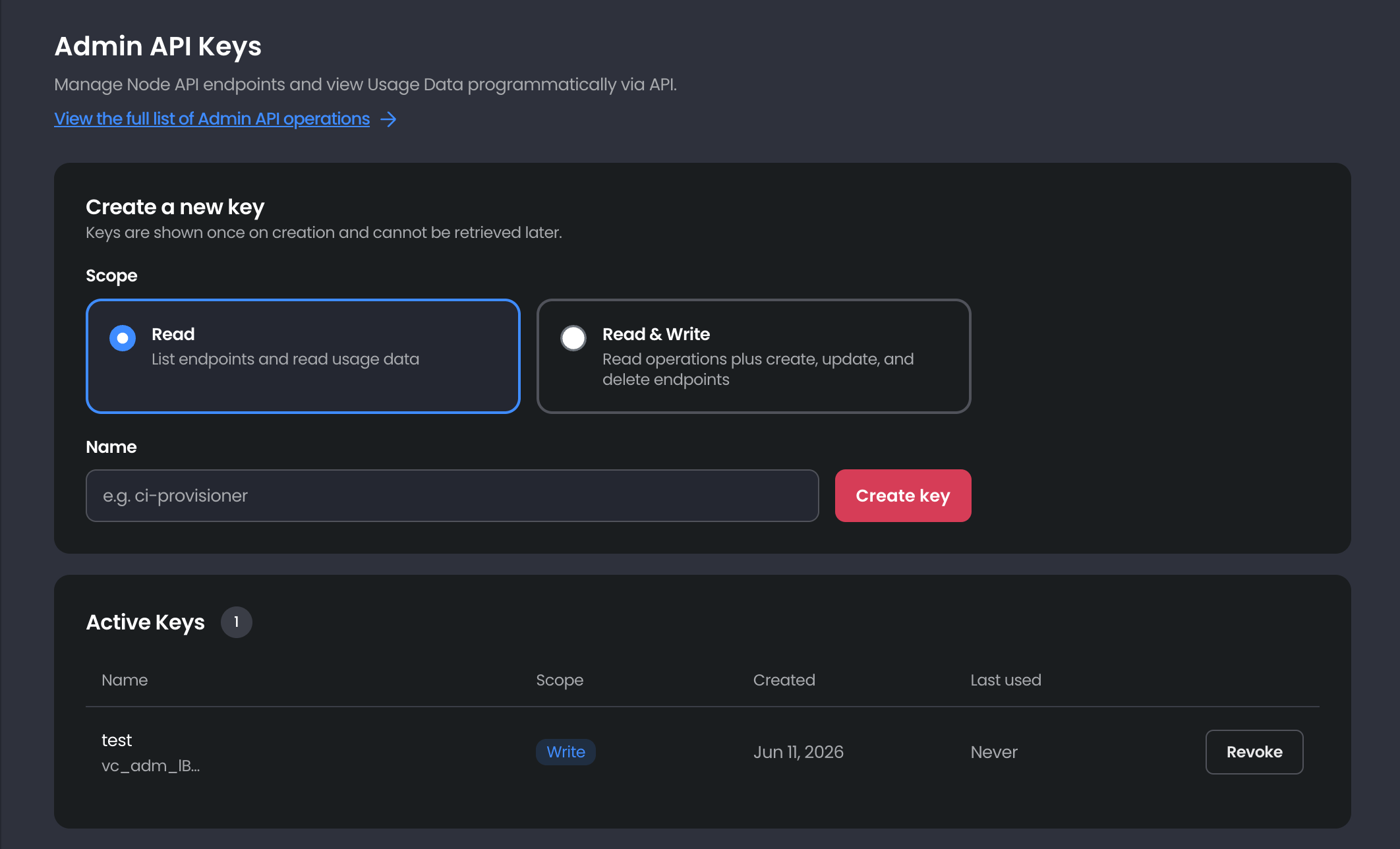 **Availability.** Admin API Keys are available on the **Scale** and **Private** Node API plans (not Free). Within those teams, only **Admins** can view this page, create keys, or revoke them. See [Teams and roles](/nodeapi/about/team-accounts) for how roles differ.
### Scopes
Each key is assigned a single scope. Choose the least-privileged one that does the job.
| Scope | What the key can do |
| - | - |
| **Read** | List endpoints and read usage data |
| **Read & Write** | Read operations plus create and delete endpoints |
### Creating a key
1. On the Admin API Keys page: [https://app.validationcloud.io/api-keys](https://app.validationcloud.io/api-keys), choose a **Scope** (Read or Read & Write).
2. Give the key a descriptive **Name** (for example, `ci-provisioner`).
3. Click **Create key**, then copy the key and store it somewhere secure.
**Keys are shown once** and can't be retrieved later. If you lose one, revoke it and create a new one. Treat keys like passwords, store them in a secrets manager and never commit them to source control.
Keys are prefixed with `vc_adm_`. Pass yours in the `Authorization` header, using the `ApiKey` scheme, on every request:
```bash theme={"theme":{"light":"github-light","dark":"github-dark-default"}}
curl -s "https://api.validationcloud.io/admin/v1/endpoints" \
-H "Authorization: ApiKey vc_adm_xxxxxxxxxxxxxxxxxxxx"
```
### Revoking a key
Find the key in the **Active Keys** list and click **Revoke**.
Revoking is immediate and permanent. Anything still using the key will start failing authentication. Roll your applications over to a new key before revoking the old one.
This documentation is built and hosted on [Mintlify](https://mintlify.com), a developer documentation platform.
**Availability.** Admin API Keys are available on the **Scale** and **Private** Node API plans (not Free). Within those teams, only **Admins** can view this page, create keys, or revoke them. See [Teams and roles](/nodeapi/about/team-accounts) for how roles differ.
### Scopes
Each key is assigned a single scope. Choose the least-privileged one that does the job.
| Scope | What the key can do |
| - | - |
| **Read** | List endpoints and read usage data |
| **Read & Write** | Read operations plus create and delete endpoints |
### Creating a key
1. On the Admin API Keys page: [https://app.validationcloud.io/api-keys](https://app.validationcloud.io/api-keys), choose a **Scope** (Read or Read & Write).
2. Give the key a descriptive **Name** (for example, `ci-provisioner`).
3. Click **Create key**, then copy the key and store it somewhere secure.
**Keys are shown once** and can't be retrieved later. If you lose one, revoke it and create a new one. Treat keys like passwords, store them in a secrets manager and never commit them to source control.
Keys are prefixed with `vc_adm_`. Pass yours in the `Authorization` header, using the `ApiKey` scheme, on every request:
```bash theme={"theme":{"light":"github-light","dark":"github-dark-default"}}
curl -s "https://api.validationcloud.io/admin/v1/endpoints" \
-H "Authorization: ApiKey vc_adm_xxxxxxxxxxxxxxxxxxxx"
```
### Revoking a key
Find the key in the **Active Keys** list and click **Revoke**.
Revoking is immediate and permanent. Anything still using the key will start failing authentication. Roll your applications over to a new key before revoking the old one.
This documentation is built and hosted on [Mintlify](https://mintlify.com), a developer documentation platform.