> ## Documentation Index
> Fetch the complete documentation index at: https://docs.validationcloud.io/llms.txt
> Use this file to discover all available pages before exploring further.
# Request logs
> Logs are a way to see the requests and responses being made to your Node API endpoints.
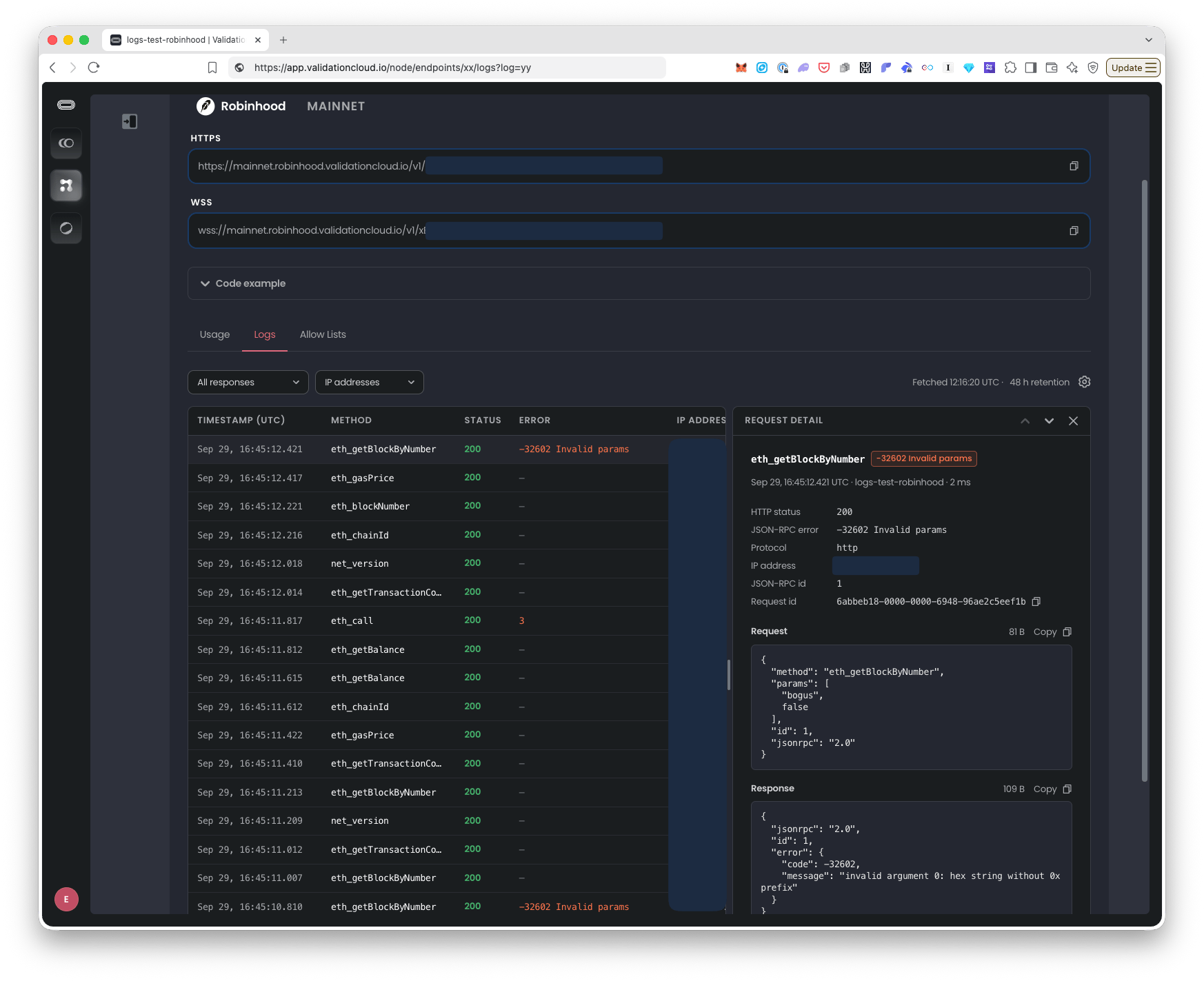 ### **What are Logs in Node API?**
*Plan restrictions: Teams on Scale Plan and above*
For those teams on qualifying plans, **Logs** lets you enable request and response logging for your Node API endpoint keys.
With Logs enabled for an endpoint:
* You can see requests that have come in and which IP address those requests have come from. You might want to use that to check that these IPs are correct. You could also combine this with the [Allow lists](/nodeapi/about/security/allow-lists-for-node-api-endpoints) feature if you want to restrict requests to only be allowed from certain IPs or domains.
* Alternatively, you might use Logs to do some debugging on a particular response, error or spot check your traffic to see that your requests are working as expected.
There is also a Logs tab on the Node API overview dashboard, so if you have Logs enabled for several of your endpoints, you can see those logs all in one place and filter them.
Good to know:
* Log retention is 48 hours.
* The Logs page refreshes automatically: new requests appear without reloading the page.
* Request and response bodies will be displayed where available, e.g. JSON RPC requests, unless they are over 4KB.
### **Where it is and who can use it**
Plans: **Scale** and **Private**. Free teams see the tab described below but with an "Unlock Logs with Scale" overlay and an Upgrade button.
Roles:
* Only **Team Admins** can turn on or off Logs for endpoint. They can view and filter as well.
* **Team Members** can only view and filter Logs for already enabled endpoints.
To enable Logs and see them at the per endpoint level:
* Node API: [app.validationcloud.io/node](https://app.validationcloud.io/node)
* Click an endpoint
* Click the **Logs** tab
* Note: *After you enable Logs on an endpoint, it takes a few minutes for the first requests to show up. They appear automatically.*
To see Logs from all endpoints that have Logs enabled:
* Node API: [https://app.validationcloud.io/node/logs](https://app.validationcloud.io/node/logs)
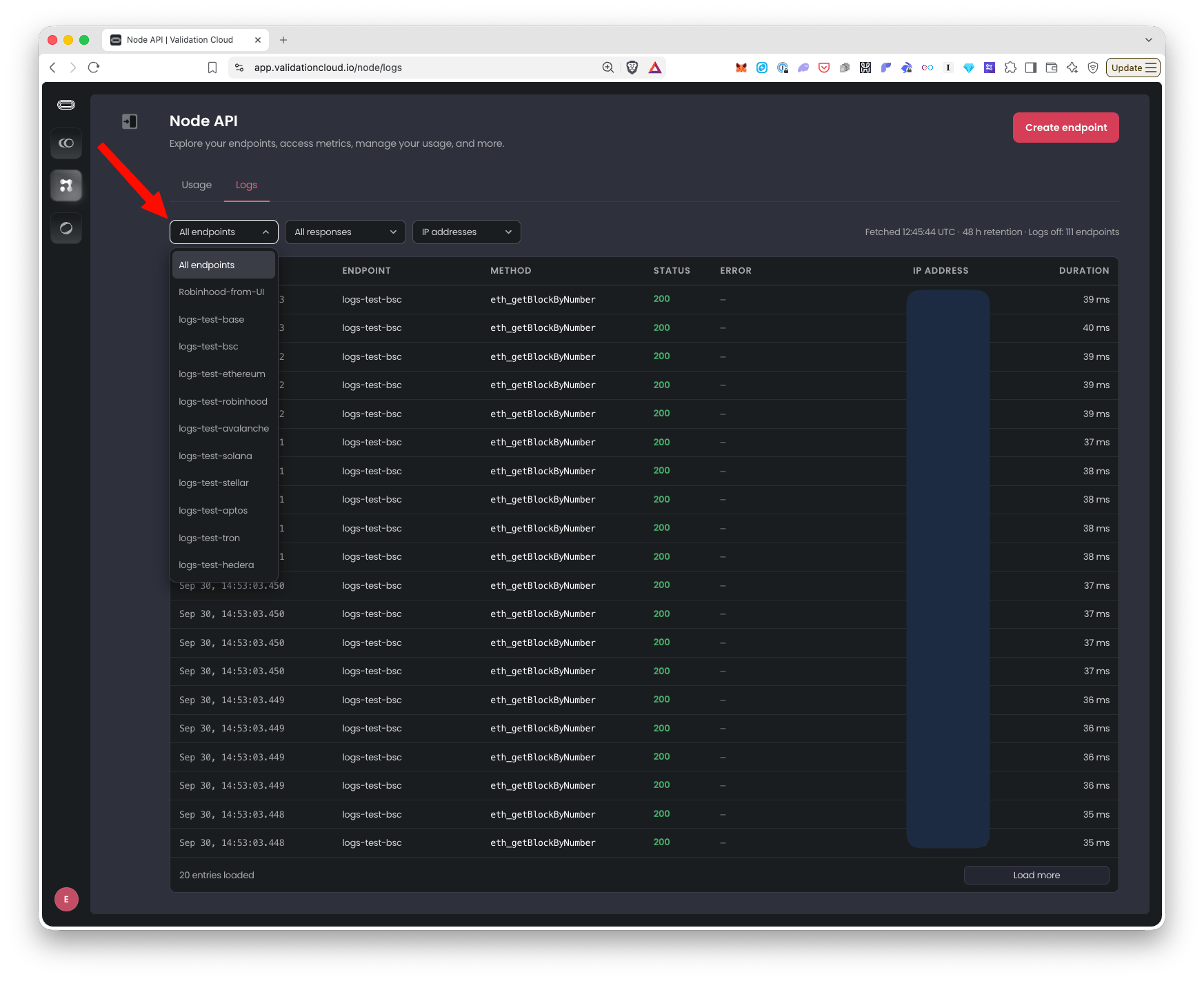
* You can use the dropdown filters to only view specific endpoints, IP addresses etc that you are interested in.
### How to enable Logs for a Node API endpoint & view them
1. Go to Node API and click on the endpoint you want to enable Logs on.
2. Select the **Logs** tab and click the button “**Turn on request logs**”, see screenshot below:
### **What are Logs in Node API?**
*Plan restrictions: Teams on Scale Plan and above*
For those teams on qualifying plans, **Logs** lets you enable request and response logging for your Node API endpoint keys.
With Logs enabled for an endpoint:
* You can see requests that have come in and which IP address those requests have come from. You might want to use that to check that these IPs are correct. You could also combine this with the [Allow lists](/nodeapi/about/security/allow-lists-for-node-api-endpoints) feature if you want to restrict requests to only be allowed from certain IPs or domains.
* Alternatively, you might use Logs to do some debugging on a particular response, error or spot check your traffic to see that your requests are working as expected.
There is also a Logs tab on the Node API overview dashboard, so if you have Logs enabled for several of your endpoints, you can see those logs all in one place and filter them.
Good to know:
* Log retention is 48 hours.
* The Logs page refreshes automatically: new requests appear without reloading the page.
* Request and response bodies will be displayed where available, e.g. JSON RPC requests, unless they are over 4KB.
### **Where it is and who can use it**
Plans: **Scale** and **Private**. Free teams see the tab described below but with an "Unlock Logs with Scale" overlay and an Upgrade button.
Roles:
* Only **Team Admins** can turn on or off Logs for endpoint. They can view and filter as well.
* **Team Members** can only view and filter Logs for already enabled endpoints.
To enable Logs and see them at the per endpoint level:
* Node API: [app.validationcloud.io/node](https://app.validationcloud.io/node)
* Click an endpoint
* Click the **Logs** tab
* Note: *After you enable Logs on an endpoint, it takes a few minutes for the first requests to show up. They appear automatically.*
To see Logs from all endpoints that have Logs enabled:
* Node API: [https://app.validationcloud.io/node/logs](https://app.validationcloud.io/node/logs)
* You can use the dropdown filters to only view specific endpoints, IP addresses etc that you are interested in.
### How to enable Logs for a Node API endpoint & view them
1. Go to Node API and click on the endpoint you want to enable Logs on.
2. Select the **Logs** tab and click the button “**Turn on request logs**”, see screenshot below:
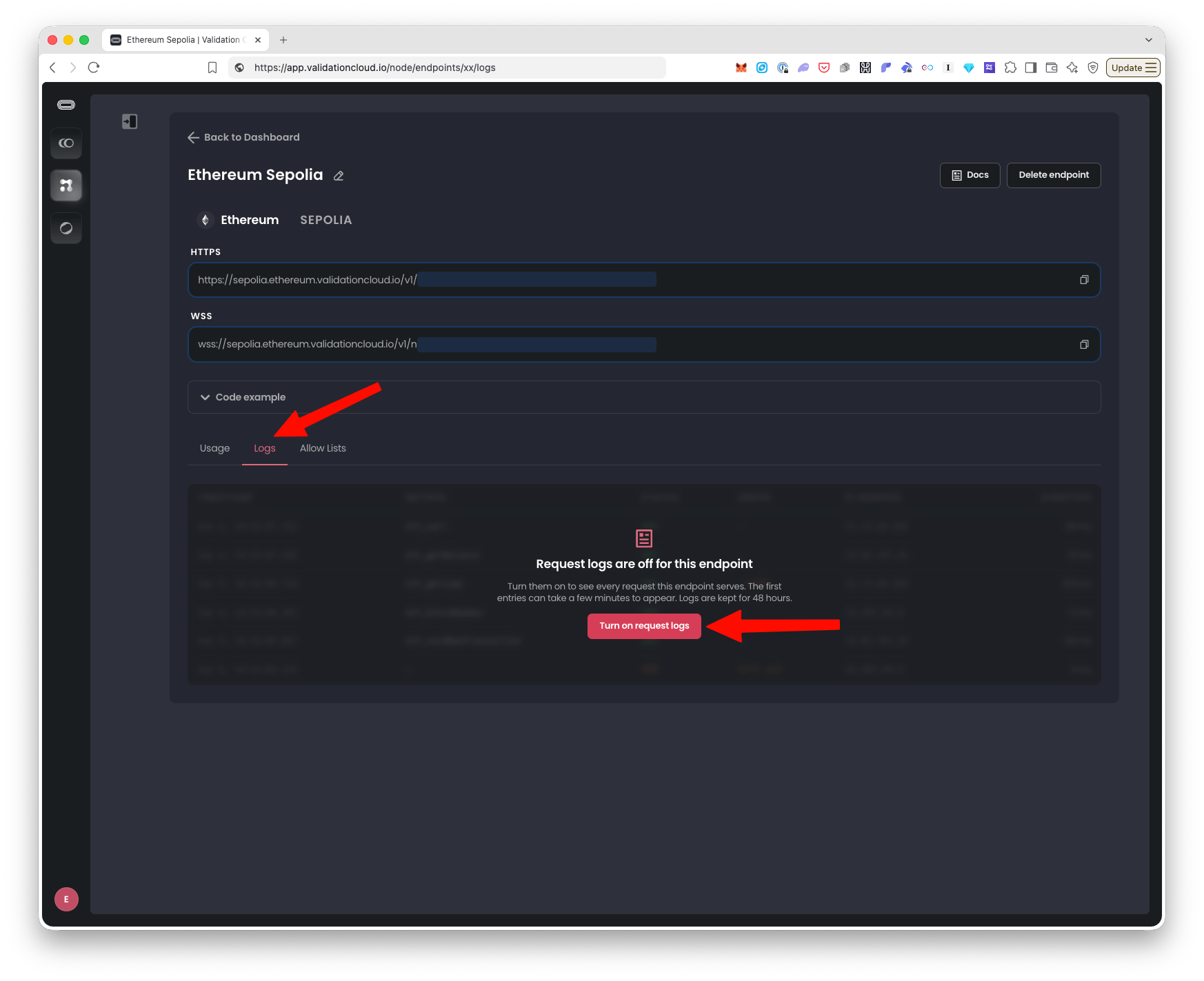 3. After 5-10 minutes, requests start to show up automatically.
1. Once logs start to come in for this endpoint, you will also be able to view them on the Node API Dashboard Logs page ([https://app.validationcloud.io/node/logs](https://app.validationcloud.io/node/logs)) which shows logs from *all* endpoints in your Team that have Logs enabled. You can filter the Node API Dashboard Logs page by which endpoints you want to see logs for, see screenshot:
3. After 5-10 minutes, requests start to show up automatically.
1. Once logs start to come in for this endpoint, you will also be able to view them on the Node API Dashboard Logs page ([https://app.validationcloud.io/node/logs](https://app.validationcloud.io/node/logs)) which shows logs from *all* endpoints in your Team that have Logs enabled. You can filter the Node API Dashboard Logs page by which endpoints you want to see logs for, see screenshot:
 **How to turn off / disable Logs for an endpoint**
1. Go to Node API and click on the endpoint you want to disable Logs for.
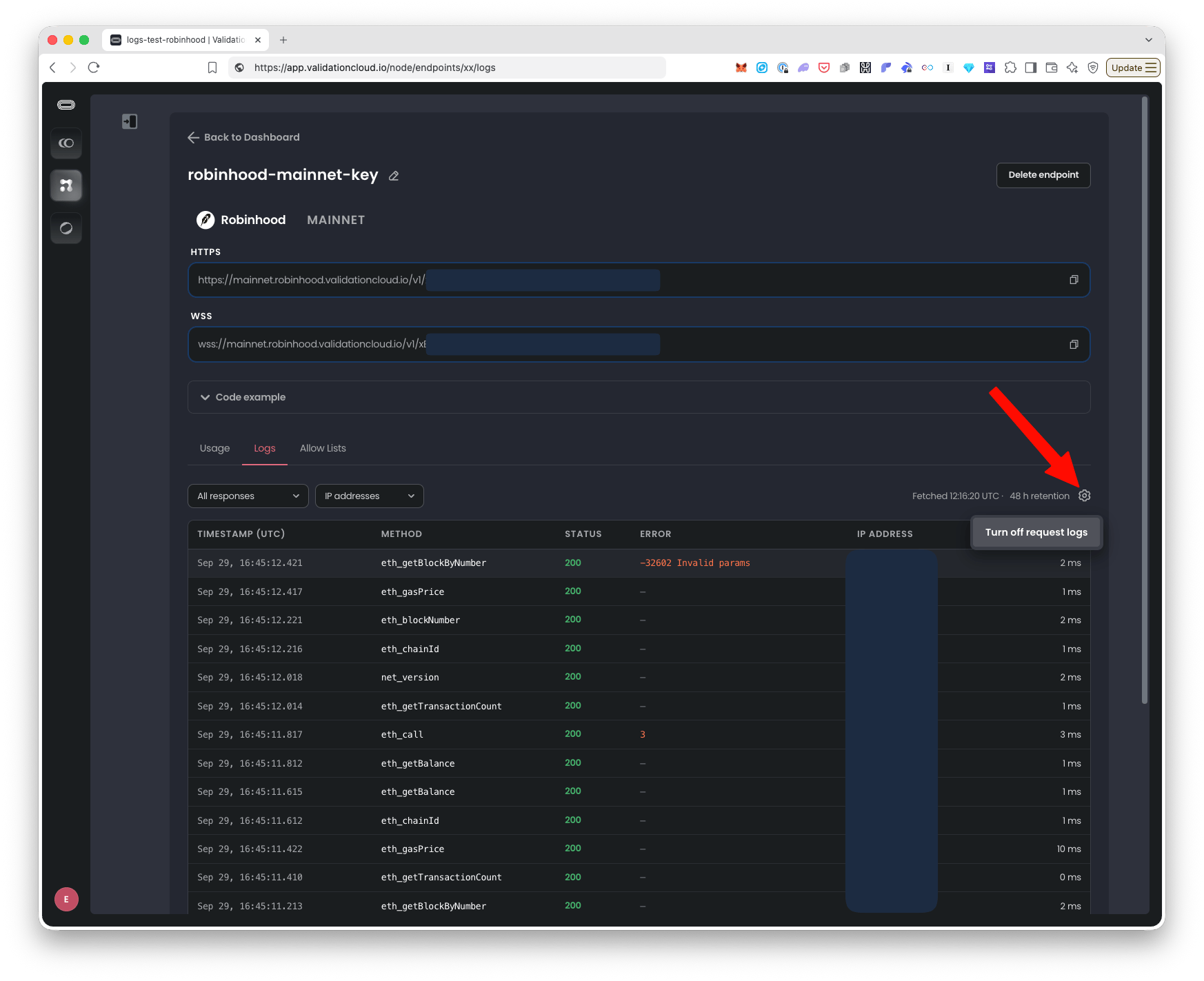
2. Click the “cog” icon above the table and click "Turn off request logs", see screenshot:
**How to turn off / disable Logs for an endpoint**
1. Go to Node API and click on the endpoint you want to disable Logs for.
2. Click the “cog” icon above the table and click "Turn off request logs", see screenshot:
 This documentation is built and hosted on [Mintlify](https://mintlify.com), a developer documentation platform.